
Himawari
A live video wallpaper for macOS that turns into your music: Apple Music's animated album art, retro hi-fi gear that follows the song, and a spinning CD for everything else.
BETA 1.3⬇︎ Download for Mac
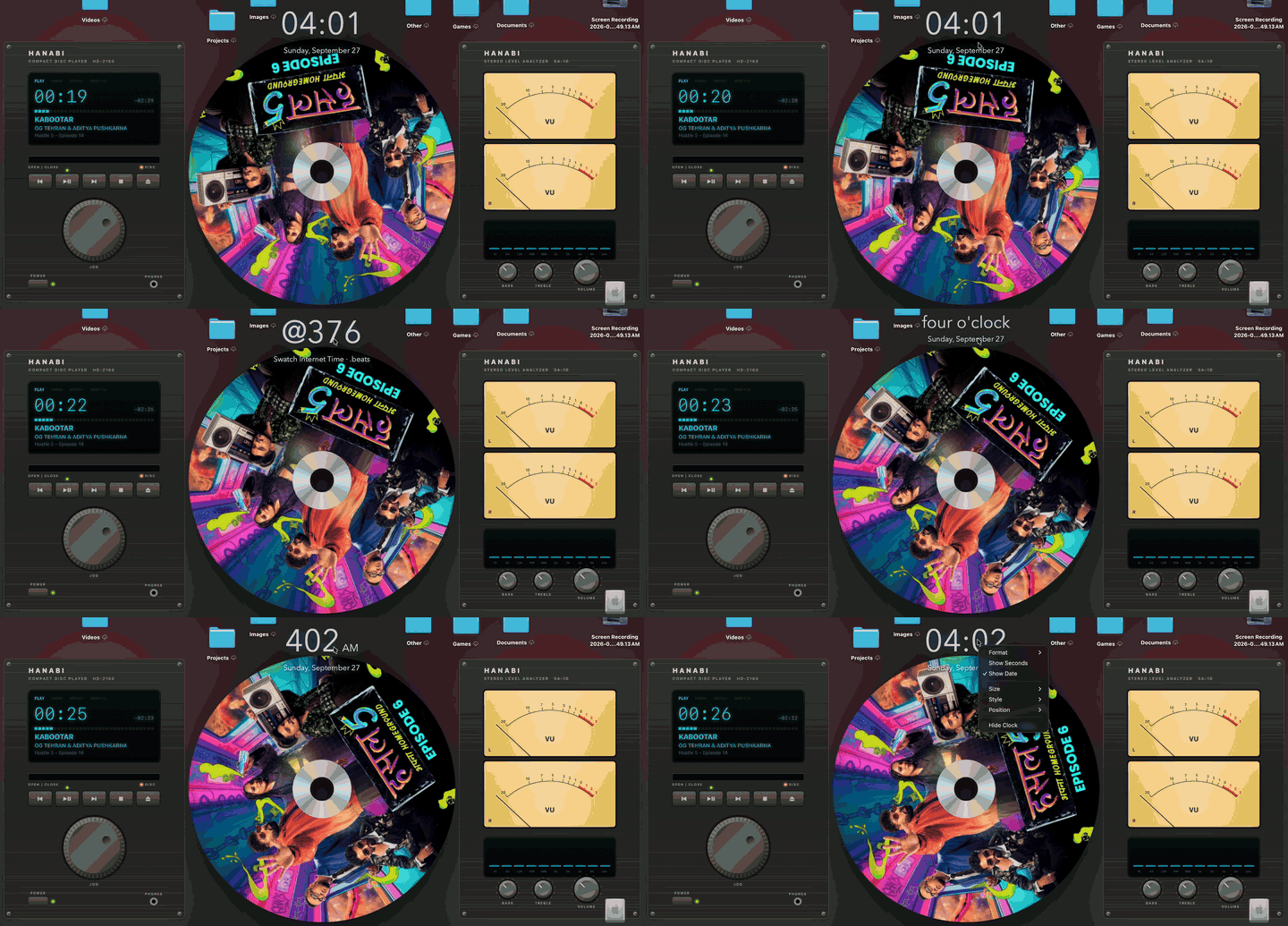
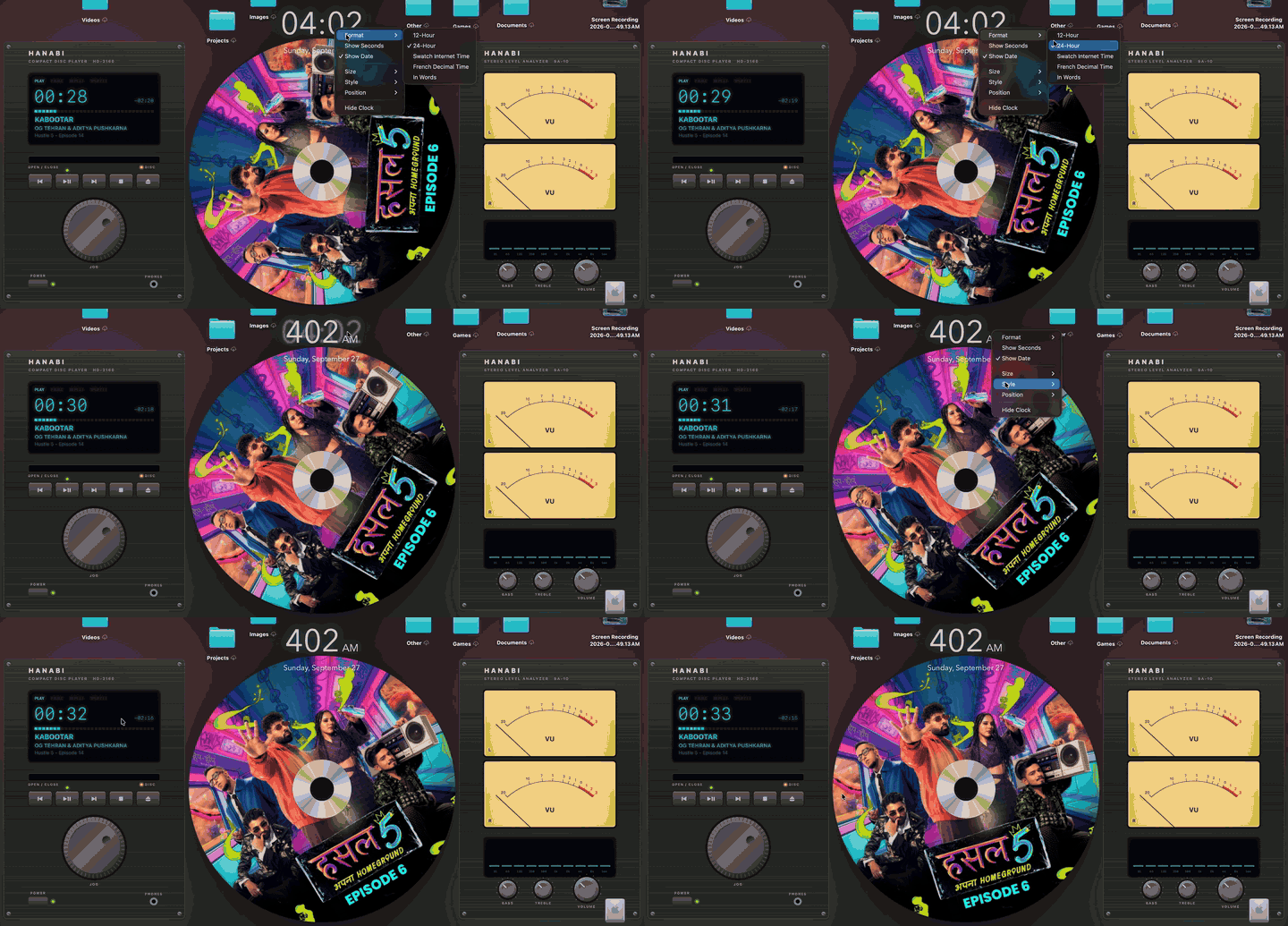
An illustration of the music wallpaper. On your desktop, the gear shows the real song, and you can play it.
See it
Recorded on a MacBook. (The first two were recorded before the rename, so the gear still says Hanabi.)


Your desktop, alive
Himawari sits quietly in the menu bar. Pick a video and it becomes your wallpaper. Press play in Music and the desktop follows the song.
Live wallpaper
Any .mp4 or .mov as your wallpaper, filling the screen. It pauses when covered, locked, asleep or on battery, so it's easy on the battery.
Any music player
Apple Music, Spotify, TIDAL, Amazon Music and Deezer, plus web players and other apps if you turn them on. Albums with an animated cover on Apple Music show it as the wallpaper, shown whole, at up to 2160×2160.
Retro hi-fi gear
Beside the artwork, a CD deck with a fluorescent display and a stereo analyzer whose VU needles and spectrum move with the actual music.
A spinning CD
Songs without an animation get their cover printed on a spinning picture disc, with a disc-changer slide between songs.
It's playable
Play, skip and seek from the gear with any player, scrub with the jog wheel or by turning the CD, and turn the volume. With Apple Music, Bass, Treble, Repeat and Shuffle work too.
Click to hide files
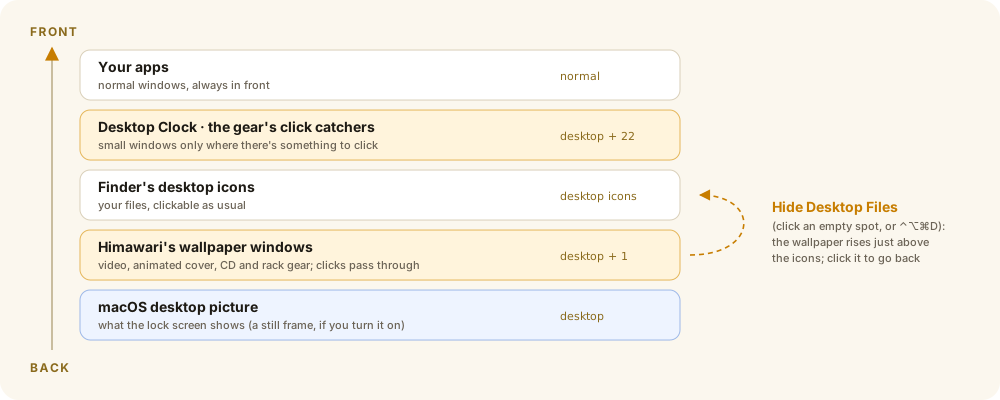
Click an empty spot on the desktop to see just the wallpaper, and click again to bring your files back. Or press ⌃⌥⌘D.
Moving lock screen
Optional: your video on the lock screen and as the screen saver, converted to Apple's own Aerial format. Apple's originals are kept.
A desktop clock
A big see-through clock that ticks with the system clock and adapts its ink to the wallpaper behind it. Click it for 24-hour, Swatch .beats, French decimal time or words.
How the music wallpaper works
Turn on Music Wallpaper While Playing in the menu. From then on, every song picks its own look, in whichever player you use.
Album has an animated cover
The loop fills the middle of the screen, kept below the notch. The bars at the sides become the CD deck and the stereo analyzer.
No animated cover
The exact cover Music shows is printed on a CD, placed so the center hole lands on a calm spot. Grab the disc and turn it like a record to scrub, with a soft whirr.
Changing songs
Skipping slides the old disc off to the left and brings the new one in from the right, spinning up as it settles. Going back runs it the other way.
Pausing
After a short grace period your own wallpaper comes back, so a quick skip doesn't make it flash.
No cover at all
Some players share no cover (a browser on many videos). Those songs get a plain disc label with the title and artist, and a real cover replaces it if one turns up.
Works with your player
The wallpaper follows whichever app is playing. Pick which ones in Players ▸, or pin one with Only Follow.
| Player | Wallpaper, CD and meters | Play, skip, seek | Volume | Repeat, shuffle | Bass, treble |
|---|---|---|---|---|---|
| Apple Music | ✓ (and animated covers) | ✓ | ✓ its own | ✓ | ✓ |
| Spotify | ✓ | ✓ | ✓ its own | ✓ | — |
| TIDAL, Amazon Music, Deezer | ✓ | ✓ | the Mac's | — | — |
| Web players (YouTube Music, SoundCloud…) off at first: turn on in Players ▸ | ✓ | ✓ | the Mac's | — | — |
| Other apps (VLC, IINA, QuickTime…) off at first | ✓ | ✓ | the Mac's | — | — |
Playlists on your desktop
Press the deck's ⏏ button (or ⌃⌥⌘P) and the deck opens a disc changer: your playlists as discs to flip through and play.
The disc changer
All your Apple Music playlists with their covers. Click one to play it; right-click to pin your favourites to the top.
Up next
The deck's display shows the playlist and the song's place in it ("DHH · 7 / 41"), and the changer lists what's next. Click a song to skip ahead to it.
Spotify, deeper
Spotify's own volume, repeat and shuffle from the gear, and your Spotify playlists in the changer: paste a playlist's share link, no sign-in needed.
Better covers from the web
Video titles like "Artist - Song (Official Video)" are read as artist and song, so the real cover (or animated cover) is found.
How it works
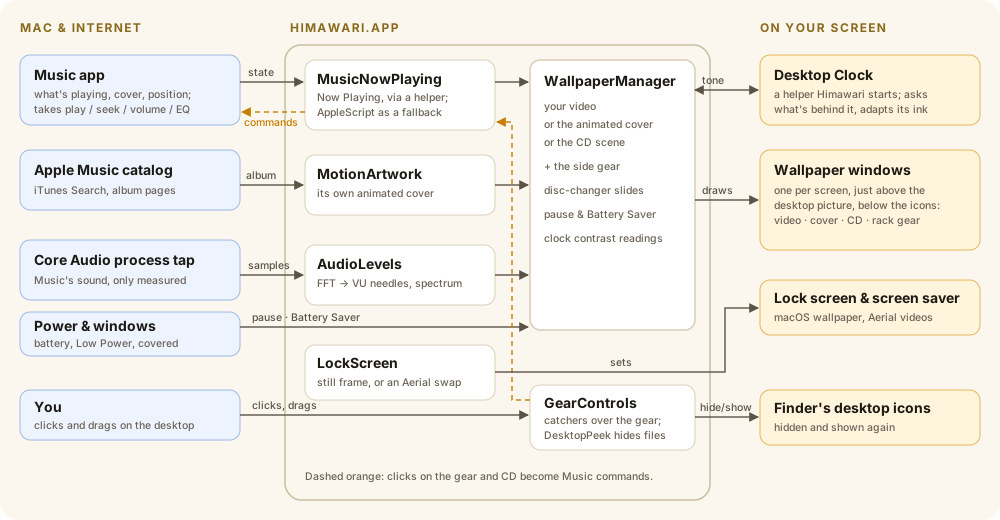
Himawari is one menu-bar app plus a tiny clock helper. Everything happens on your Mac; the only things it fetches are album covers from Apple.
Install
- Download the DMG and open it.
- Drag Himawari onto Applications, then open it from Applications.
- The first time, macOS may say it can't check Himawari for malicious software, because it isn't notarized (that needs a paid Apple Developer ID). Right-click Himawari ▸ Open ▸ Open, or go to System Settings ▸ Privacy & Security and click Open Anyway.
- Click the sunflower in the menu bar, choose Choose Video…, and pick a video.
Permissions it asks for
| Permission | Why |
|---|---|
| Automation ▸ Music | To read what's playing and the album cover, and to control Music from the gear. |
| Automation ▸ Finder | To check whether a desktop click landed on a file (for click to hide files). |
| System Audio Recording Only | To measure the music's loudness for the VU meters. Nothing is recorded; decline and the meters animate on their own. |
Privacy
No accounts, no analytics, no telemetry. Himawari uploads nothing about you. It only fetches album artwork from Apple:
| Connects to | When | For |
|---|---|---|
itunes.apple.com | A song starts | Finding the album, to look for its animated cover |
music.apple.com | A song starts | The animated cover's video address, from the public album page |
*.mzstatic.com | A song starts | The cover at full resolution, and the animated cover itself |
youtube.com | Only if you turn on the YouTube loop | Playing the song's music video in YouTube's embedded player |
Questions
Does it drain my battery?
It idles at well under 1% CPU. On battery or in Low Power Mode, Battery Saver streams artwork at 1080p, rests the gear's motion and skips the blurred fill. You can also pause the wallpaper on battery or whenever the desktop is covered.
Does it work with Spotify?
Yes, since Beta 1.2: Spotify, TIDAL, Amazon Music and Deezer are followed out of the box, and web players (YouTube Music, SoundCloud) and other apps can be turned on in the Players menu. Play/pause, skipping, seeking and volume work with all of them (volume is the Mac's, for players that can't be asked for their own). Since Beta 1.3, Spotify also gets its own volume, repeat, shuffle and playlists. Bass and treble need Apple Music's equalizer.
Does it work with playlists?
Since Beta 1.3: the deck's ⏏ button opens a disc changer with your Apple Music playlists, what's next in the one playing, and Spotify playlists you add by link.
Which video formats work?
Anything macOS plays: .mp4 and .mov (H.264 or HEVC). .webm doesn't play; convert it with ffmpeg -i in.webm -c:v h264_videotoolbox -b:v 8M -an out.mp4.
What if Apple changes something?
Two parts use undocumented Apple behavior: reading the system's Now Playing state and finding animated covers on Apple Music's public pages. If either stops working after a macOS update, Himawari falls back (to AppleScript, and to the CD).
Is it open source?
Yes: the code is on GitHub at dhairyab0069/himawari-mac, with build instructions. Issues and suggestions are welcome.
Credits
Inspired by Hanabi
Hanabi for GNOME by Jeff Shee, the live video wallpaper extension for GNOME, was the starting point and gave this project its first name. Himawari is a separate macOS app written from scratch in Swift; none of Hanabi's code is used.
Built with AI assistance
Himawari was built with Claude Code, Anthropic's AI coding assistant, as a pair programmer. I decided what to build, how it should look and behave, and tested every change on my own Mac. It's a tested personal project, not an audited product.
Standing on Apple's shoulders
AVFoundation, Core Animation, Core Audio process taps and SwiftUI do the heavy lifting, and Apple Music provides the animated covers. The Now Playing helper follows the approach of mediaremote-adapter.